Choosing a CMS based on its pricing page is a bit like choosing a house based on the asking price. The number is real, but it’s nowhere near the full story.
I’ve been implementing, migrating, and advising on website platforms for the best part of two decades. In that time I’ve seen businesses genuinely surprised by what they end up spending — not because anyone misled them, but because the costs that compound over time are rarely the ones that appear in the comparison tables.
This piece is an attempt to fix that. It’s the total cost of ownership conversation that agencies and vendors won’t always have with you upfront, because it’s not always in their interest to do so.
Why “Free” and “From £X/month” Are Both Misleading
WordPress is technically free. Wix starts at £10 a month. Webflow is from £15. These numbers are accurate and almost entirely useless for planning purposes.
The platform licence or software cost is almost always the smallest line item in the total picture. What matters is everything else: hosting, security, development, plugins, training, maintenance, and the hidden time cost of managing whatever you’ve chosen. None of that appears on the pricing page.
Let me go platform by platform.
WordPress
What you pay upfront: Hosting (£10 to £100+ monthly depending on provider and traffic), a theme (£0 to £200 one-off, or £0 if you build custom), and an initial build (£500 to £50,000+ depending on complexity and who you hire).
What you pay ongoing: This is where WordPress gets expensive quickly without people realising it.
Plugin licences are the first thing. A professional WordPress site typically runs ten to thirty active plugins. Many are free. Many aren’t, or have free versions that are hobbled enough to push you towards paid. Yoast SEO Premium, Advanced Custom Fields Pro, WP Rocket, Gravity Forms, a backup solution, a security plugin — you can easily reach £500 to £1,500 annually in plugin licences before you’ve done anything unusual.
Security is the second thing. WordPress’s dominance makes it the most targeted CMS on the internet. Managing that is either a cost in tools (Wordfence, Sucuri, Cloudflare) or a cost in developer time when something goes wrong, or both. Businesses that skip this find out the hard way.
Maintenance is the third. WordPress updates constantly — core, themes, plugins, all independently. Updates that aren’t applied create security vulnerabilities. Updates that are applied sometimes break things. Both outcomes cost you either time or money. If you’re paying a developer to manage this, expect £100 to £500 a month depending on the complexity of your site and their rate.
The number nobody puts in the spreadsheet: Developer dependency. WordPress is flexible because it’s customisable, and customisation means code, and code means someone needs to write it and maintain it. If your business doesn’t have a developer in-house, you’re renting one — and that relationship has ongoing costs that are easy to underestimate at the start of a project.
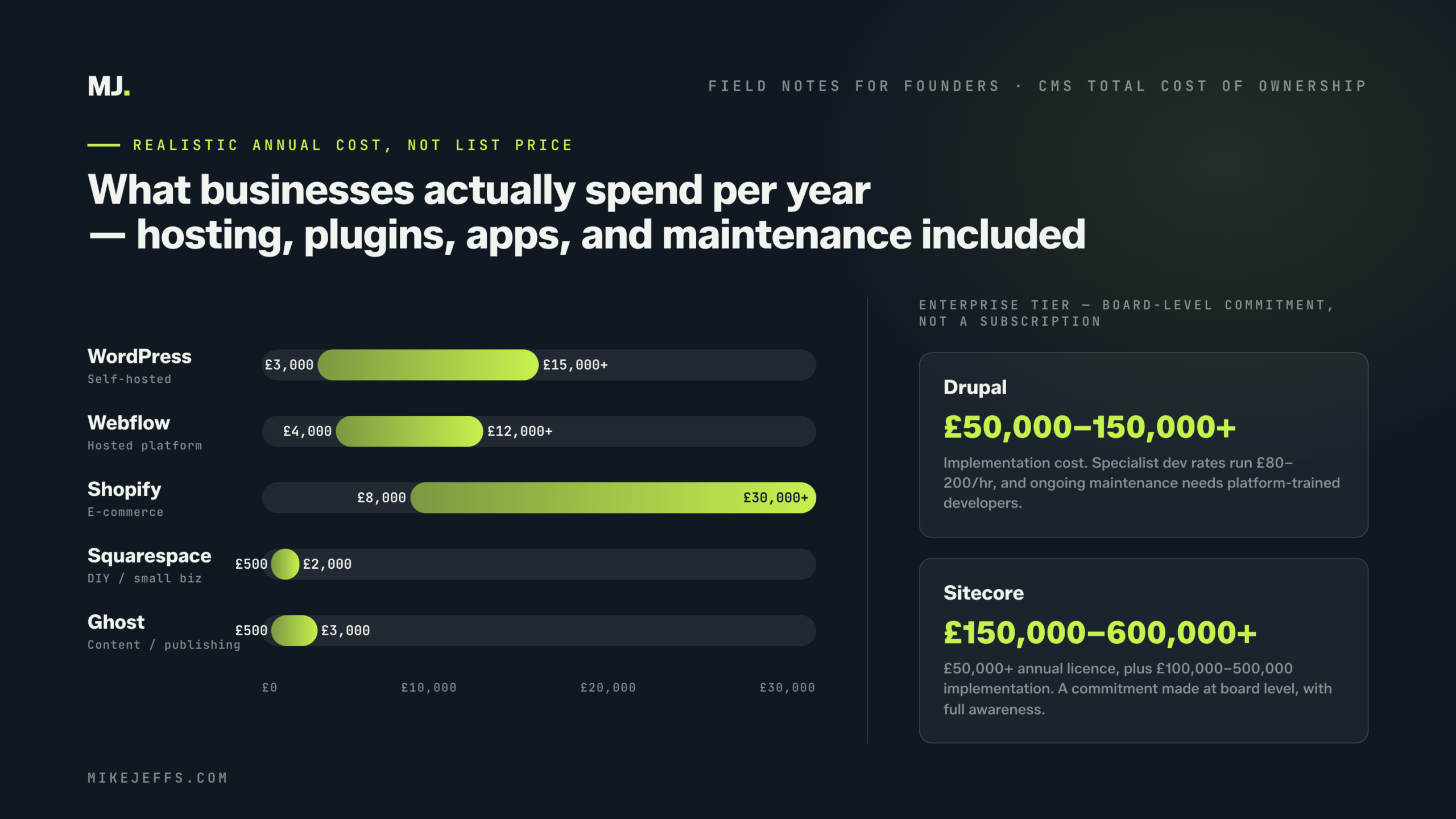
Realistic total annual cost for an SME: £3,000 to £15,000+, depending heavily on how much development support you need.
Webflow
What you pay upfront: Webflow is a hosted platform, so there’s no separate hosting cost. Build costs depend on who does the work — a Webflow specialist typically charges £75 to £150+ per hour, and a proper business site will take thirty to eighty hours minimum.
What you pay ongoing: The subscription tiers are where this gets interesting. Webflow’s pricing has moved significantly upward in recent years. A CMS site plan runs from around £19 to £35 per month. The Business plan, which you’ll likely need once you have meaningful traffic or more advanced CMS requirements, sits at £212+ per month. That’s £2,500 annually before you’ve paid anyone to update the site.
Workspace plans, which control who can edit the site, add further cost if multiple team members need access.
What people miss: Webflow’s integration ecosystem is more limited than WordPress, which means workarounds. Those workarounds often involve third-party tools (Zapier, Make, external CRM connections) that each carry their own subscription costs. The cleaner experience of Webflow often trades complexity in one area for complexity in another.
Realistic total annual cost for an SME: £4,000 to £12,000+, front-loaded in build costs with meaningful ongoing subscription costs.
Shopify
What you pay upfront: Theme (free to £300+), setup and configuration (£1,000 to £20,000+ depending on complexity), and any custom development for features the platform doesn’t handle out of the box.
What you pay ongoing: Shopify’s pricing is relatively transparent on the surface. Basic is £25 per month, Shopify is £65, Advanced is £344. The issue is that almost every serious e-commerce implementation ends up needing apps to fill gaps — product reviews, advanced filtering, subscriptions, upsells, loyalty programmes, returns management. These add up fast. A moderately complex Shopify store commonly runs ten to twenty apps at an average of £15 to £50 per month each.
The transaction fee is the other thing that compounds silently. If you’re not using Shopify Payments (which isn’t available everywhere and doesn’t suit every business), you pay between 0.5% and 2% of every transaction to Shopify on top of your payment processor’s fees. At meaningful revenue levels, this becomes a significant line item.
The number nobody puts in the spreadsheet: The cost of migration away from Shopify if you outgrow it. Your product data, customer data, and order history can be exported. Your theme, your customisations, and your URL structure are another matter. Shopify migrations at scale are expensive projects.
Realistic total annual cost for a growing e-commerce business: £8,000 to £30,000+, heavily influenced by app spend and transaction volume.
Squarespace
What you pay upfront: Very little — it’s one of the more genuinely accessible platforms to get started on. A basic site can be live within a day using a template.
What you pay ongoing: Plans range from £12 to £49 per month (£144 to £588 annually). That’s the easy part.
The harder part is what Squarespace costs you in constraint. It’s not a financial cost — it’s an opportunity cost. Squarespace sites are difficult to migrate away from (your design and structure don’t export cleanly), limited in their SEO flexibility compared to WordPress or Ghost, and hit a ceiling on customisation that growing businesses tend to reach faster than they expect.
When you factor in the cost of rebuilding on a more capable platform two or three years in — which is a very common Squarespace journey — the total cost of ownership looks quite different from the monthly subscription.
Realistic total annual cost: Low on paper (£500 to £2,000+), but factor in the migration project you’re likely to face and it changes.
Ghost
What you pay upfront: If you’re on Ghost Pro (their hosted option), there’s no setup cost beyond any theme customisation. If you’re self-hosting, you’ll need a developer to configure it on a VPS, which is a few hours of work.
What you pay ongoing: Ghost Pro plans run from £9 to £199 per month depending on member count. For most content-driven businesses, the Starter or Creator plan covers the essentials. It’s one of the more honest pricing structures in the market.
Self-hosting costs are low (£10 to £30 per month for a decent VPS) but require someone to manage updates and infrastructure. Ghost doesn’t update itself.
What you miss: Ghost is excellent for what it does and cost-effective for content businesses. The cost comes if you try to make it do things it wasn’t designed for — complex product pages, e-commerce, advanced integrations. Forcing the wrong platform into the wrong job is always expensive.
Realistic total annual cost: £500 to £3,000+ for hosted, depending on audience size.
Drupal and Sitecore
I’m grouping these because the honest conversation about both platforms is the same: if you’re not already in a position where you need enterprise-grade CMS capabilities, the costs are hard to justify.
Drupal development rates run from £80 to £200+ per hour because the specialist pool is smaller. A proper enterprise Drupal implementation starts at £50,000 and can run well into six figures. Ongoing maintenance requires skilled developers who know the platform.
Sitecore licensing alone starts at £50,000 annually. Implementation on top of that typically adds another £100,000 to £500,000. These are not platforms you stumble into — they’re platforms you commit to at board level with full awareness of the investment.
The total cost of ownership for either is a CFO conversation, not a marketing one.
The Costs That Appear on No Pricing Page
Across every platform, there are three costs that consistently surprise businesses.
Training and onboarding. Someone on your team needs to learn how to use whatever you’ve chosen. For simple platforms this is a few hours. For complex ones it’s weeks. Factor in the time cost of that learning curve, particularly for content editors who aren’t technical.
Content migration. Moving your existing content from one platform to another is almost always more complex and time-consuming than expected. URLs need to redirect. Images need to be optimised and re-uploaded. Metadata needs to be recreated. For a site with hundreds of pages, this is a substantial project.
The cost of a bad decision. The most expensive CMS outcome I see is the one where a business chooses the wrong platform, builds on it, realises the mistake eighteen months later, and has to rebuild. That’s two builds for the price of one, plus the opportunity cost of a suboptimal site in the interim. The right conversation upfront — even if it costs a few hours of consultancy — is almost always cheaper than discovering the problem the hard way.
A More Useful Way to Think About This
Rather than starting with platform costs, start with a three-year total cost of ownership model. Estimate the build cost, the annual platform and tooling costs, the ongoing maintenance and development costs, and the likely migration cost at the end of the period if you outgrow it.
Then compare that to the next platform on your list under the same model.
The platform that looks cheapest on a monthly basis is rarely the cheapest over three years. And the platform that looks most expensive upfront is sometimes the one that saves money over time by not breaking, not needing constant maintenance, and not requiring a rebuild at the point where you least want one.
The pricing page tells you what the platform costs. What you actually need to know is what using it will cost. Those are rarely the same number.